
From box to first light in four steps.
Install, power, and pair your Neon Flex. Follow the steps in order, or jump to the part you need. Everything below works on iOS and Android.
●5-10 Min Install●No Hub Required●Works With Matter
Neon Flex Setup
04 steps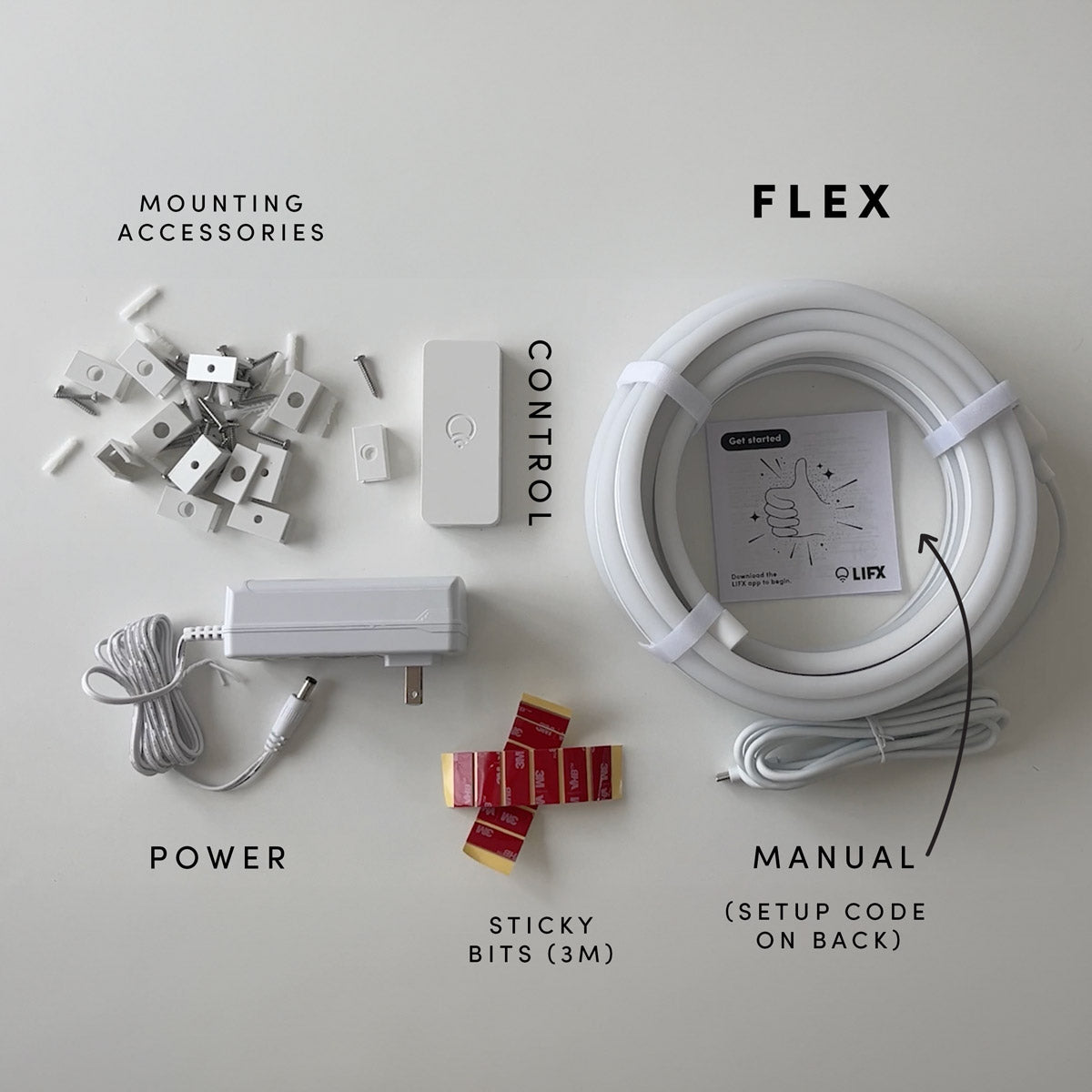
Everything you need to install and onboard your Neon Flex is included in the box.
In the box:
- LIFX Neon Flex LED rope light
- LIFX controller
- Power supply
- Installation channels
- 3M adhesive
- Screws
You’ll Need:
- A smartphone (iOS 18.0+ or Android 8.1+)
- The LIFX app (download from App Store or Google Play
- A 2.4 GHz Wi-Fi network (Most smart devices require 2.4 GHz. If your router combines 2.4 GHz and 5 GHz, that’s usually fine.)
- Your Wi-Fi password
Important Notes:
- Keep your phone near the light during setup.
- Make sure Bluetooth is enabled.
- Ensure your phone is connected to the same Wi-Fi network you want the light to use.
Installation type
- Mains powered only — connects directly to a standard indoor outlet via the included plug. No transformer or low voltage system required.
Mounting method (choose one)
- Surface mount using channels — press the Neon Flex into the provided channel clips and fix to your surface with screws or double-sided adhesive
- Freeform — shape and position the flex without channels for temporary or creative installations
Surface mount steps
- Lay the Neon Flex out and bend it into your desired shape before fixing anything down — plan the full run before committing.
- Position the channel clips along your surface in the desired shape, spacing them evenly. For screws: attach through the holes provided. For adhesive: peel the backing and press firmly onto a clean, dry surface. Hold each clip for 30 seconds.
- Press the Neon Flex into the channel clips along its full length until it seats securely at each point.
Connecting to power
- Ensure the product is unplugged before assembling or positioning any part of it.
- Connect the controller to the Neon Flex. If you connected the flex before powering the controller, it will automatically run a detection sweep down the full length when powered on.
- If you connected the flex after powering the controller, press the button on the controller for 1 second. A light will run the full length of the flex as it detects it.
- Plug into a standard indoor outlet.
Tips
- Do not secure the Neon Flex or its wiring with staples, nails, or any sharp or conductive materials that could pierce the casing — do not damage the wire.
- Do not hang ornaments or other objects from the cord or flex.
- Do not close doors or windows on the flex or its cable — this can damage the wire insulation.
- Do not use with an extension cord unless the plug can be fully and firmly inserted — do not alter or replace the plug.
- Keep away from heat sources including heaters, fireplaces, and candles.
- This product is for indoor use only — not suitable for use in dusty or moist environments.
- Install out of reach of children.
- To factory reset, press the button on the controller for 5 seconds. The flex will return to original factory settings.
Select your device below to get step-by-step setup instructions tailored to your phone. We recommend using the Matter QR code method for the quickest and most reliable connection — you'll find the QR code in your product manual, or printed on the back of your device.
Choose your OS
On iOS, you can set up in two ways
We recommend Matter for the most reliable setup. Use Wi-Fi if you've lost the QR code or can't access it.
iOS Onboarding via Matter QR code
- Plug in the light and power it on.
- Open the LIFX app and tap the + icon in the bottom right.
- Tap New Product, then New Light.
- Tap Scan QR Code and use the camera to scan. Alternatively, type the 11-digit Matter code from the product (or Manual).
- Tap Add to LIFX and Choose Home from the list.
- Wait for the Home app to connect to the light.
- Select a Location (e.g. Bedroom) and give it a Name (e.g. Bedside Lamp).
- You're all set.
iOS Onboarding via WiFi
- Plug in the light and power it on.
- Open the LIFX app and tap the + icon in the bottom right.
- Tap New Product, then New Light.
- Tap Set Up Device Manually.
- Go to your phone's Wi-Fi Settings:Matter: From Other Networks, select the LIFX Light.HomeKit: LIFX appears under Set Up New Device; after 15 minutes it moves to Other Networks. Select the LIFX Light from there.
- Return to the LIFX app.
- Select your Wi-Fi and enter the password.
- Wait for the light to connect via Wi-Fi (up to a minute).
- Finish setup by selecting a Group and giving it a Name.
- Opt in or out of any Suggested Routines.
- You're all set.
On Android, you can set up in two ways
We recommend Matter for the most reliable setup. Use Wi-Fi if you've lost the QR code or can't access it.
Android onboarding via Matter QR code
- Plug in the light and power it on.
- Open the LIFX app and tap the + icon in the bottom right.
- Tap New Product, then New Light.
- Tap Scan QR Code and use the camera to scan. Alternatively, type the 11-digit Matter code from the product (or Manual).
- Tap Add to LIFX and Choose Home from the list.
- Wait for the Home app to connect to the light.
- Select a Location (e.g. Bedroom) and give it a Name (e.g. Bedside Lamp).
- You're all set.
Android onboarding via Wi-Fi
- Plug in the light and power it on.
- Open the LIFX app and tap the + icon in the bottom right.
- Tap New Product, then New Light.
- Tap Set Up Device Manually.
- Select your new LIFX light when it appears.
- Select your Wi-Fi and enter the password.
- Wait for the light to connect via Wi-Fi (up to a minute).
- Finish setup by selecting a Group and giving it a Name.
- Opt in or out of any Suggested Routines.
- You're all set.