






LIFX Smart Dimmer Switch 4 Button - White

★★★★★ 3.8 - 31 reviews on Amazon
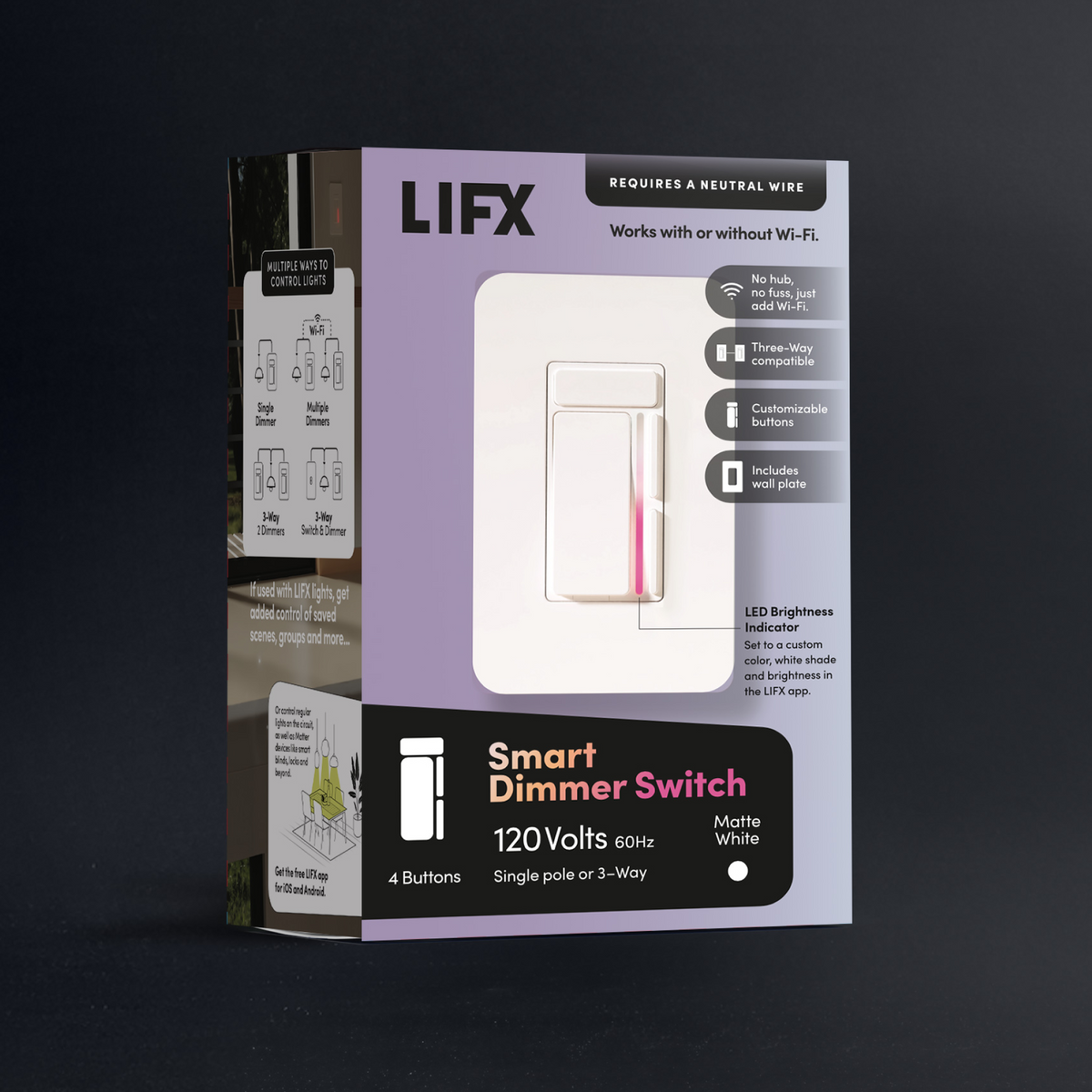
Smart lighting shouldn't rely on voice commands or apps alone. The LIFX Smart Dimmer is a smart light switch and dimmer switch built for tactile, in-wall control, no compromise on flexibility. It works with both LIFX smart lights and traditional bulbs, combining familiar dimming with scene control, customizable buttons, and an 8-zone gradient light bar for instant visual feedback. Whether you're adjusting brightness or triggering a scene across the room, this dimmer switch keeps control effortless, responsive, and right on the wall where you need it.


$34.98 Sold out
  • No hub required
  • 16M colors + whites
  • Matter certified
  • Ready in 90 seconds
  • Free shipping over $79
  • 2-year warranty
Also at:

Why you'll love it

Everything you need to know

All New Controls

  • Works with what you have. The LIFX Smart Dimmer installs where your old switch lives and works with regular dimmable bulbs out of the box, or pair it with SuperColor for billions of colors.
  • Wall control that works. Four customizable buttons with single press, double press, and hold give you up to 12 programmable actions for scenes and routines.
  • Always know where it’s set. A built-in LED indicator shows your light level at a glance, with color and brightness customizable in the app.
  • Smart when you want it, simple when you don’t. Connect to 2.4GHz Wi-Fi for scheduling and voice control, or skip it and it still works as a dimmer.
  • Built for the whole home. Matter certified and compatible with Alexa, Google Home, Apple Home, and SmartThings, it’s three-way compatible and handles up to 500W incandescent and 300W LED (neutral wire required).
Dimmer Switch Setup

06 steps

Everything you need to mount and connect your LIFX Dimmer is included in the box.

In the box:

  • 1 x LIFX Dimmer
  • 1 x Mounting Frame
  • 1 x Decorative Wall Plate
  • 2 x Inner Frame Screws
  • 2 x Mounting Screws
  • 5 x Wire Nuts
  • 12 x Wire Labels

You’ll Need:

  • A smartphone (iOS 18.0+ or Android 8.1+)
  • The LIFX app (download from App Store or Google Play)
  • A 2.4 GHz Wi-Fi network (Most smart devices require 2.4 GHz. If your router combines 2.4 GHz and 5 GHz, that’s usually fine.)
  • Your Wi-Fi password

Important Notes:

  • Keep your phone near the switch during setup.
  • Make sure Bluetooth is enabled.
  • Ensure your phone is connected to the same Wi-Fi network you want the light to use.
  • Before setup, factory reset the product by holding all 4 buttons for 10–15 seconds. This clears any previous settings or connections and ensures a clean start.

Before you start

  • Turn off power at the circuit breaker or fuse box — do not rely on the wall switch alone
  • Check that your wall box has a neutral wire (usually white). If not, consult a qualified electrician before proceeding
  • You'll need a Phillips screwdriver and wire strippers

Single pole installation (one dimmer on a circuit)

  1. Remove the existing switch or dimmer by turning off power at the circuit breaker, then unscrewing the wall plate and pulling the old switch from the wall box.
  2. Identify your wires and apply the included wire labels — black label (AC-L) to the live wire, white label (AC-N) to the neutral wire, green label (G) to the ground wire, and red label (LOAD) to the load wire running to the fixture.
  3. Connect the LIFX Dimmer wires to the existing wires using the provided wire nuts — live to live (black), load to load (red), neutral to neutral (white), and ground to ground (green).
  4. Carefully fold all wires into the wall box, then secure the dimmer using the provided mounting screws.
  5. Place the mounting frame over the installed dimmer and secure with the two inner frame screws.
  6. Snap the decorative wall plate onto the mounting frame — top first, then press the bottom in until it clicks.
  7. Restore power at the circuit breaker. The indicator light bar will illuminate to confirm it is working.

3-way installation (two switches controlling one fixture)

In a 3-way setup, the LIFX Dimmer must be installed at the location connected to the fixture load. A standard (non-smart) switch can remain at the other location.

  1. Remove the existing switches from both wall boxes by turning off power at the circuit breaker, then unscrewing the wall plates and pulling the switches out.
  2. Identify which wall box is connected to the incoming 120V live wire (LINE side) and which is connected to the fixture (LOAD side).
  3. At both locations, label the traveler wires T1 and T2 — note the colors as they must match at both ends.
  4. At the LOAD side, connect the LIFX Dimmer wires using wire nuts — load wire to load (red), T1 traveler to dimmer live (black), T2 traveler to dimmer traveler (brown), neutral to neutral (white), and ground to ground (green).
  5. At the LINE side, install your standard 3-way switch — connect the live wire and T1 traveler to the switch, T2 to the remaining terminal, and ground to the switch ground.
  6. At both locations, carefully fold all wires into the wall box and secure the switches using the provided mounting screws.
  7. Fit the mounting frame over the LIFX Dimmer and secure with the two inner frame screws, then snap the decorative wall plate on — top first, then press the bottom until it clicks.
  8. Restore power at the circuit breaker. The indicator light bar will illuminate to confirm it is working.

Tips

  • Double-check all connections are tight and correct before restoring power.
  • Keep the T1 and T2 traveler wire labels consistent at both wall box locations — mismatched travelers are the most common cause of 3-way wiring issues.
  • If unsure about any wiring, consult a qualified licensed electrician — all connections must comply with local and National Electrical Code (NEC) standards.
  • The neutral wire is required for this dimmer to operate. If your wall box does not have one, do not attempt to bypass it.

Select your device below to get step-by-step setup instructions tailored to your phone. We recommend using the Matter QR code method for the quickest and most reliable connection — you'll find the QR code in your product manual, or printed on the back of your device.

Choose your OS

Choosing the Correct Load Type

During setup, the LIFX app will ask what type of load is connected.

Choosing the correct load type is essential for proper operation.

Smart Light

Select Smart Light whenever the connected load consists of LIFX smart lights.

In Smart Light mode:

  • Connected LIFX lights remain continuously powered.
  • Brightness and colour are controlled digitally through the LIFX app.
  • All four buttons become programmable smart controls.

LIFX smart lights should always be configured using Smart Light mode.

Dimmable Load

Choose Dimmable Load when controlling compatible dimmable LED, incandescent or halogen lighting.

In this mode, the Dimmer uses traditional TRIAC dimming to control brightness.

Switchable Load

Choose Switchable Load when controlling non-dimmable lighting that only requires physical on/off switching.

Accessing button setup

  • From the LIFX App, tap the Settings Cog
  • Navigate to Accessories > Switch
  • Select the Dimmer switch you want to configure
  • Tap Buttons > Setup

Factory defaults

  • Top Button — Single Press: Fade on / off
  • Main Paddle — Single Press: On / off
  • Dim Up Button — Single Press: Increase brightness
  • Dim Down Button — Single Press: Decrease brightness

Configuring a button

  1. Select the button you want to configure (e.g. Dim Up Button).
  2. Choose the press type you want to assign: Single Press, Double Press, or Long Press.
  3. Tap Add Target — targets can be locations, groups, lights, or scenes. Select your target and tap Add.
  4. Tap Add Action — choose the action you want to assign. Actions are one of three types:

    Local — run directly on the light and do not require the LIFX Cloud
    Matter — sent locally via the Matter Protocol
    Cloud — sent via the LIFX Cloud

  5. Select your action and tap Select.
  6. Tap Save — your button configuration is complete.

Tips

  • To control other Matter devices (Apple Home, Samsung SmartThings, etc.), set up button actions inside your Matter ecosystem app.
  • If a button triggers both LIFX and Matter devices, you can disable the LIFX action on that button to prevent duplicate triggers.

Dimmer Switch 4 Button White

  • Color range16M colors
  • FittingHardwired
  • Dims4.6 in × 1.7 in × 2.8 in
  • Warranty2 years
Download manual Download spec sheet
ModelLFX/DIMBarcode9347403005777
Customer Reviews

Real homes. Real lights.

★★★★★ 3.8 - 31 reviews on Amazon
  • 5 stars: 1 (100%)
  • 4 stars: 0 (0%)
  • 3 stars: 0 (0%)
  • 2 stars: 0 (0%)
  • 1 star: 0 (0%)
J
John F. (United States)

The switch is more intuitive and responsive than the older LIFX switches. I recommend it.

LIFX · Smart Dimmer
Energize 82%

Tap the paddle for on / off

Tap the top button to change scenes*

Tap or hold the up / down buttons to dim

* Each button gesture is currently limited to one scene allocation.
No RISK

Buy it. Try it. Decide later.

  • 30 nights to decideNot right? Send it back for a refund. $14.99 return shipping fee applies.
  • 2-year warrantyHardware coverage, end to end. We ship a replacement first.
  • Free Shipping ** All orders over $79 ship free 
Does the LIFX Dimmer require a neutral wire?

Yes — a neutral wire is required. Without one, the dimmer will not work. If you're unsure whether your wiring includes a neutral wire, open the outlet box and look for it (usually white). If it's not present, consult a qualified electrician.

What is the maximum load the dimmer can handle?

1-Gang: 300W dimmable LED · 500W incandescent
2-Gang: 200W dimmable LED · 400W incandescent
3-Gang: 150W dimmable LED · 300W incandescent

Why are my lights flickering or buzzing after installation?

Step 1: Check that all bulbs are seated firmly and that all wire connections in the wall box are securely fastened.

Step 2: Confirm your bulbs are rated as dimmable. Non-dimmable bulbs are not compatible with this switch and will flicker or buzz.

Step 3: In the LIFX App, ensure the correct load type is selected for your dimmer. An incorrect setting can cause flickering or buzzing at certain brightness levels.

Step 4: Try adjusting the brightness level — flickering or buzzing sometimes only occurs at certain points on the dimming range. Note that setting a minimum brightness level is not currently supported in the app.

What is the warranty on the LIFX Dimmer?

The LIFX Dimmer carries a two-year limited warranty from the date of original retail purchase, covering defects in materials and workmanship under normal use. LIFX will repair or replace a defective product at no charge during this period. The warranty does not cover damage from misuse, accidents, or modifications.

What Wi-Fi frequency does the LIFX Dimmer use?

The LIFX Dimmer connects to your home's 2.4 GHz Wi-Fi network — the same band used by most smart home devices. This frequency is great for wall-mounted devices because 2.4 GHz travels further and penetrates walls better than 5 GHz, giving you reliable coverage throughout your home.

Can I use the LIFX Dimmer with standard dimmable LED bulbs?

Absolutely — the LIFX Dimmer works great with most standard dimmable LED and incandescent bulbs, no smart bulbs required. Just install your favourite dimmable LEDs and enjoy smooth dimming control straight away. The dimmer has an adjustable dimming range, so you can fine-tune the low-end level to suit your preference.

Featured in the publications you already trust
WIREDThe VergeWirecutterEngadgetFast CompanyThe New York TimesGizmodo
Stay in the loop

New products, launches and the occasional good deal. Unsubscribe any time.