
From box to first light in four steps.
Install, power, and pair your LIFX Downlight. Follow the steps in order, or jump to the part you need. Everything below works on iOS and Android.
Downlight Setup
04 steps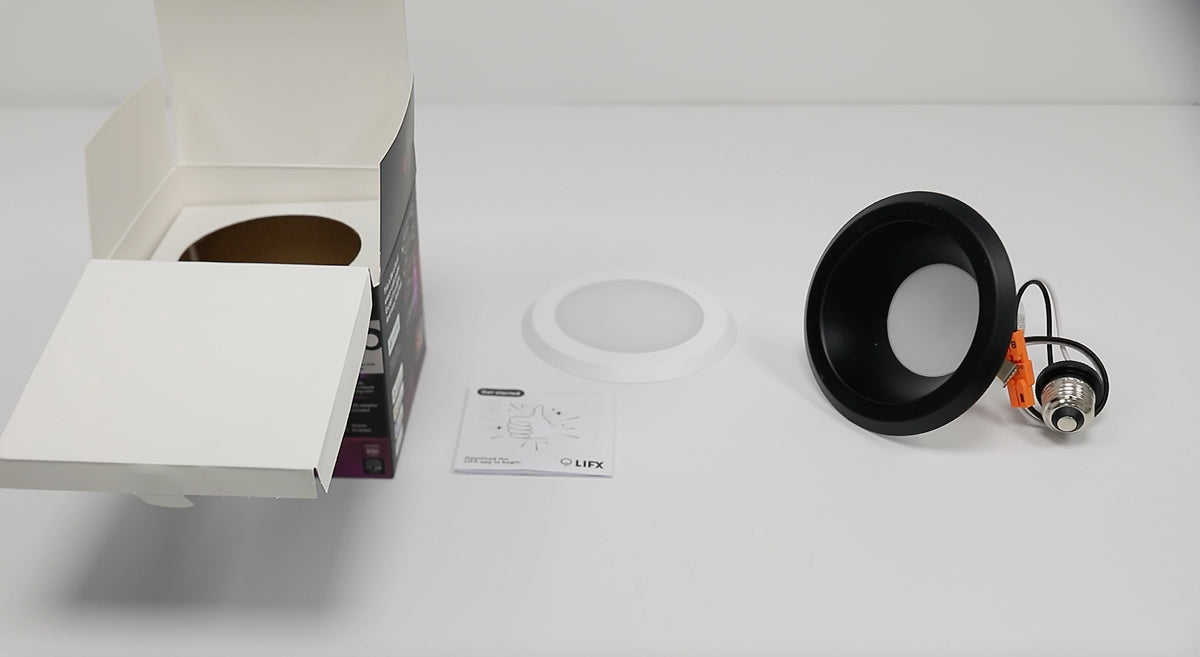
Everything you need to install and style your Downlight is included in the box.
In the box:
- 1 x SuperColour Canless Downlight with White Trim
- 1 x Optional Magnetic Recessed Black Trim
- 1 x Optional Magnetic Flush White Diffuser
- 1 x LED Canless Power Supply
You’ll Need:
- A smartphone (iOS 18.0+ or Android 8.1+)
- The LIFX app (download from App Store or Google Play
- A 2.4 GHz Wi-Fi network (Most smart devices require 2.4 GHz. If your router combines 2.4 GHz and 5 GHz, that’s usually fine.)
- Your Wi-Fi password
Important Notes:
- Keep your phone near the light during setup.
- Make sure Bluetooth is enabled.
- Ensure your phone is connected to the same Wi-Fi network you want the light to use.
Before you start
- Turn off power at the switch and circuit breaker
- If not qualified to work with luminaire electrical systems, contact a qualified electrician
Canless installation steps
- Cut a hole in the ceiling sized to match your product.
- Wire the junction box using the included connectors.
- Plug in the downlight and tighten the connector.
- Bend back the spring clips and push the fixture up into the hole until flush with the ceiling.
Style (choose one)
- Deep baffle in white — remove the black magnetic face
- Deep baffle in black — leave the black magnetic face in place
- Flush to ceiling in white — attach the magnetic flush diffuser for more evenly distributed light
- Want a custom colour match? Paint the detachable black face to suit
Tips
Do not use with a standard incandescent dimmer — the light will not operate correctly.
Install in a fixture that provides sufficient airflow around the light for optimal performance.
Not suitable for outdoor, wet, or excessively hot environments (e.g. near ovens or heaters).
To factory reset, turn the light off and on at the switch 5 times (roughly one switch per second). The light will cycle through four colors and stop on white when the reset is successful.
Select your device below to get step-by-step setup instructions tailored to your phone. We recommend using the Matter QR code method for the quickest and most reliable connection — you'll find the QR code in your product manual, or printed on the back of your device.
Choose your OS
On iOS, you can set up in two ways
We recommend Matter for the most reliable setup. Use Wi-Fi if you've lost the QR code or can't access it.
iOS Onboarding via Matter QR code
- Plug in the light and power it on.
- Open the LIFX app and tap the + icon in the bottom right.
- Tap New Product, then New Light.
- Tap Scan QR Code and use the camera to scan. Alternatively, type the 11-digit Matter code from the product (or Manual).
- Tap Add to LIFX and Choose Home from the list.
- Wait for the Home app to connect to the light.
- Select a Location (e.g. Bedroom) and give it a Name (e.g. Bedside Lamp).
- You're all set.
iOS Onboarding via WiFi
- Plug in the light and power it on.
- Open the LIFX app and tap the + icon in the bottom right.
- Tap New Product, then New Light.
- Tap Set Up Device Manually.
- Go to your phone's Wi-Fi Settings:Matter: From Other Networks, select the LIFX Light.HomeKit: LIFX appears under Set Up New Device; after 15 minutes it moves to Other Networks. Select the LIFX Light from there.
- Return to the LIFX app.
- Select your Wi-Fi and enter the password.
- Wait for the light to connect via Wi-Fi (up to a minute).
- Finish setup by selecting a Group and giving it a Name.
- Opt in or out of any Suggested Routines.
- You're all set.
On Android, you can set up in two ways
We recommend Matter for the most reliable setup. Use Wi-Fi if you've lost the QR code or can't access it.
Android onboarding via Matter QR code
- Plug in the light and power it on.
- Open the LIFX app and tap the + icon in the bottom right.
- Tap New Product, then New Light.
- Tap Scan QR Code and use the camera to scan. Alternatively, type the 11-digit Matter code from the product (or Manual).
- Tap Add to LIFX and Choose Home from the list.
- Wait for the Home app to connect to the light.
- Select a Location (e.g. Bedroom) and give it a Name (e.g. Bedside Lamp).
- You're all set.
Android onboarding via Wi-Fi
- Plug in the light and power it on.
- Open the LIFX app and tap the + icon in the bottom right.
- Tap New Product, then New Light.
- Tap Set Up Device Manually.
- Select your new LIFX light when it appears.
- Select your Wi-Fi and enter the password.
- Wait for the light to connect via Wi-Fi (up to a minute).
- Finish setup by selecting a Group and giving it a Name.
- Opt in or out of any Suggested Routines.
- You're all set.