







From box to first light in four steps.
Install, power, and pair your LIFX String Lights. Follow the steps in order, or jump to the part you need. Everything below works on iOS and Android.
String Light Setup
04 steps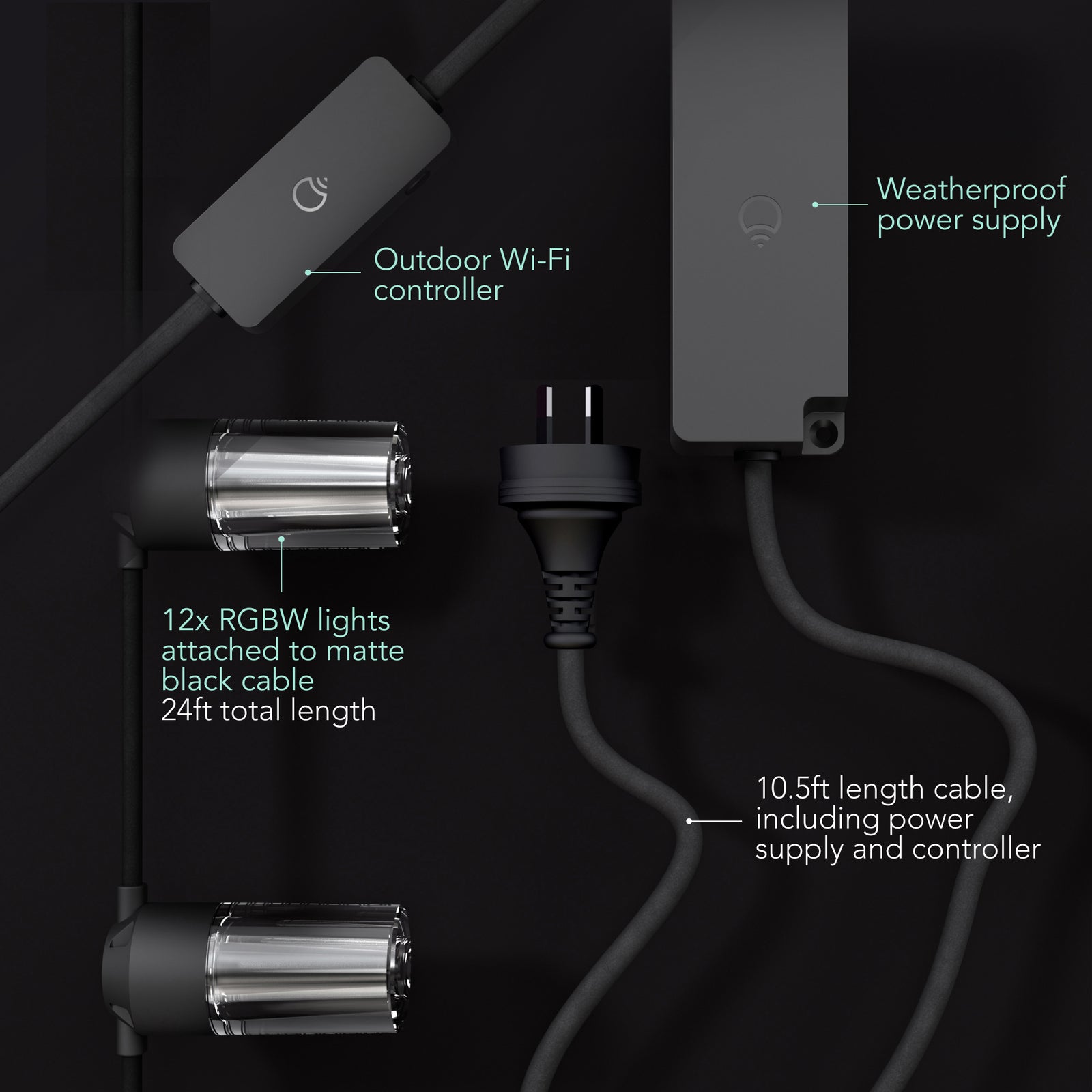
Everything you need to install and onboard your String Lights is included in the box.
In the box:
- 24ft length string light.
- 12 uniquely addressable LED bulbs.
- Weather-proof power supply.
- Outdoor Wi-FI controller.
- 10.5ft length power cable.
You’ll Need:
- A smartphone (iOS 18.0+ or Android 8.1+)
- The LIFX app (download from App Store or Google Play
- A 2.4 GHz Wi-Fi network (Most smart devices require 2.4 GHz. If your router combines 2.4 GHz and 5 GHz, that’s usually fine.)
- Your Wi-Fi password
Important Notes:
- Keep your phone near the light during setup.
- Make sure Bluetooth is enabled.
- Ensure your phone is connected to the same Wi-Fi network you want the light to use.
Installation steps
- Connect all the pieces in the kit together securely.
- Plug the controller into a power outlet — use a Ground Fault Circuit Interrupting (GFCI) outlet where possible.
- Press the button on the controller for 2 seconds. A light will run down the full length of the string as it detects and counts all connected pieces.
Combining 2 or 3 kits (optional)
- Unplug the power, then unscrew the end cap on each string.
- Connect the strings together and tighten the connector caps to ensure a secure, watertight seal.
- Power back on, then press the controller button to re-count all pieces. Do not connect more than 3 kits (72' total).
Tips
- Do not secure the string with staples, nails, or other sharp or conductive materials — do not damage the wire.
- Keep at least 16 ft (4.8 m) from pools and spas. Keep plugs and receptacles dry. Do not submerge.
- Do not mount near heaters, fireplaces, or candles.
- Do not hang ornaments or other objects from the cord or bulbs.
- Do not use with an incandescent dimmer.
- To factory reset, turn the light off and on at the switch 5 times (roughly one switch per second). The light will cycle through four colors and stop on white when the reset is successful.
Select your device below to get step-by-step setup instructions tailored to your phone. We recommend using the Matter QR code method for the quickest and most reliable connection — you'll find the QR code in your product manual, or printed on the back of your device.
Choose your OS
On iOS, you can set up in two ways
We recommend Matter for the most reliable setup. Use Wi-Fi if you've lost the QR code or can't access it.
iOS Onboarding via Matter QR code
- Plug in the light and power it on.
- Open the LIFX app and tap the + icon in the bottom right.
- Tap New Product, then New Light.
- Tap Scan QR Code and use the camera to scan. Alternatively, type the 11-digit Matter code from the product (or Manual).
- Tap Add to LIFX and Choose Home from the list.
- Wait for the Home app to connect to the light.
- Select a Location (e.g. Bedroom) and give it a Name (e.g. Bedside Lamp).
- You're all set.
iOS Onboarding via WiFi
- Plug in the light and power it on.
- Open the LIFX app and tap the + icon in the bottom right.
- Tap New Product, then New Light.
- Tap Set Up Device Manually.
- Go to your phone's Wi-Fi Settings:Matter: From Other Networks, select the LIFX Light.HomeKit: LIFX appears under Set Up New Device; after 15 minutes it moves to Other Networks. Select the LIFX Light from there.
- Return to the LIFX app.
- Select your Wi-Fi and enter the password.
- Wait for the light to connect via Wi-Fi (up to a minute).
- Finish setup by selecting a Group and giving it a Name.
- Opt in or out of any Suggested Routines.
- You're all set.
On Android, you can set up in two ways
We recommend Matter for the most reliable setup. Use Wi-Fi if you've lost the QR code or can't access it.
Android onboarding via Matter QR code
- Plug in the light and power it on.
- Open the LIFX app and tap the + icon in the bottom right.
- Tap New Product, then New Light.
- Tap Scan QR Code and use the camera to scan. Alternatively, type the 11-digit Matter code from the product (or Manual).
- Tap Add to LIFX and Choose Home from the list.
- Wait for the Home app to connect to the light.
- Select a Location (e.g. Bedroom) and give it a Name (e.g. Bedside Lamp).
- You're all set.
Android onboarding via Wi-Fi
- Plug in the light and power it on.
- Open the LIFX app and tap the + icon in the bottom right.
- Tap New Product, then New Light.
- Tap Set Up Device Manually.
- Select your new LIFX light when it appears.
- Select your Wi-Fi and enter the password.
- Wait for the light to connect via Wi-Fi (up to a minute).
- Finish setup by selecting a Group and giving it a Name.
- Opt in or out of any Suggested Routines.
- You're all set.